Show Me the Money!

Featured Image: Copyright: ©RichVintage Photography

These last two school terms have been insufferable! Like, wearing-my-shoulders-as-earrings, can’t-move-my-neck, horrid-headaches insufferable. So, we have the issues with financial aid that are still ongoing and who knows when they will be resolved. This is with Adam and me calling student financial services nearly every day and getting such varying responses that eventually culminate in us being told my case is being reviewed. The case has been reviewed since September, supposedly 🙄. The people at SNHU’s financial office are very kind and sympathetic, but they don’t know what’s going on half the time — as we say here, the right hand doesn’t know what the left hand’s doing.

Neither Adam nor I get why things are not moving faster on SNHU’s financial aid department’s part because they have not been paid for my last two terms, which is around $3,000, give or take. They aren’t even getting my Pell grants and whatever else I qualify for that I don’t have to pay back. I have yet to graduate, but that is somewhat on me, but not really.

Because of the recent next-level AI emergence, professors/instructors have been on an unofficial AI witch hunt without any official regulations in place, which has made classes a nightmare not just for me, but loads of SNHU online students who post in the Facebook group. Apparently, which I have witnessed firsthand, students simply cannot sound intelligent/professional and do the work on their own, so must all be utilizing AI. The work then gets sent for review, and I have yet to see any students being found guilty, for lack of a better term that I can’t think of right now.

My work was submitted to the review board more than once last term by the instructor, who whined incessantly about AI in the announcements without providing any proof we students were using it, but that didn’t stop the instructor from failing my assignments as well as my discussion posts and bitching about vagueness and originality, like I was thinking too much and not using enough quotes, which are flagged by TurnItIn as plagiarism; a key reason I prefer to paraphrase and cite instead of quoting 🙄. These fails were after I submitted my work to the college’s writing center and received positive feedback from them, save the discussion posts, which aren’t worth much.

I am an A student except for applied statistics, which I got a C+. The only problems I have had with my grades have been issues with the instructors, like the Shakespeare bitch giving me a zero for a fully formed and thought-out PowerPoint (which should have garnered some points since I did the assignment, even if she wanted to stick me with an F).

I failed last term’s seminar class, which is a capstone, and I chose a different class (I’ve covered this in previous posts) and received the same instructor. This is my last class before graduating. I emailed my student advisor and explicitly told him I would rather not graduate than have to deal with a certain instructor again. He was of no help, told me to stick it out and do my best, blah, blah, blah, and so I started the class. I got the same instructor I spoke to my advisor about.

The first three multiparagraph discussion posts got Fs again and my first milestone (just the paper intro and thesis statement) got a C- with completely unhelpful feedback and accusatory language again. My introduction and thesis statement were checked at the writing center, and they had no problem identifying the thesis and approving it and the introduction. I am dealing with enough stress because of financial aid, unpaid bills, and just a whopping amount of stress, so I stopped participating after week 3. I don’t have the spoons to deal with this guy for another full eight weeks.

I absolutely will not take one of these classes again if I get the same instructor. My degree is for me, and I have principles and a very hard stance regarding them. Obviously, I want to graduate, but I do not handle stress well and it manifests physically, which I cannot tolerate. I am done trying to conform, especially when it is not beneficial to the situation.

So Long, Shakespeare!!

The 80-year school term is finally over! I haven’t looked at final grades because it makes me too anxious, but I think I got a B in Shakespeare 😒😒. My first non-A since Applied Statistics. I guess that’s not bad since I received two (unearned) Fs on two assignments. I’m disputing these grades through the university dispute/resolution department.

For my intermediate poetry workshop final poetry collection, I was told I am too poemy, tortured, and dramatic. Yeah, my life has sucked at times and poetry is how I prod myself to deal and heal. Sorry I am not Mother Goose 🤷‍♀️, although she could get pretty dark, too. Not to mention, what kind of person calls another complete stranger “tortured”? ‘Scuse me??

I guess I use “you” too much in my poetry as well, but what else do you (see??) call an audience? I can’t litter my poems with thee, thy, or one (as in, “how would one feel…” instead of “how would you feel…”); that would look pretentious, impersonal, and weird. I swear, my poetry instructor would rather shoot herself in the foot than give a compliment. I hope I don’t act like her after I’m published; I’d rather shoot myself in the foot!


Anyway, those classes are finished (aside from the dispute), and I’ve been complaining way too much on here, so I’m putting all that behind me 😊😊. Adam was a complete prince on my birthday and didn’t wish me a happy birthday at all! Since April is Death Month, he knows that I do not like to have my birthday acknowledged. He came and told me he knew what the day was but he wasn’t going to mention it, i.e., wish me happy birthday, because that is my wish, and I thought it was very sweet. I have been 29 for a few years and often forget my real age when doctors ask.


Speaking of, I’m going to see a surgeon about my hernia next week. I know it’s an absolute mess in there and I feel bad for the guy or gal who will be rooting around in my tummy. The pain has improved since Neville hasn’t been using me as a trampoline but I still want to see the surgeon. I had my hernia repair over ten years ago and people with mesh repairs usually have to have revisions.


I did the trash up and took it out because Adam was sleeping and I didn’t know he had set an alarm to get up and take it out (I’ve not taken the trash out for 15 years). I had Neville go with me to the bins because it was dark outside and I don’t like going down near the road at night. I gave him a trash bag to pull so he could help me and it didn’t go well 😂. It started out okay with him pulling it and following me but when we got close to the bin, he ran back up in the yard and started shaking the bag because he thought we were playing.

So, I have started training him in the living room to hold (without shaking) a bag and carry it while following me. He is really so smart. I started with a grocery bag with some things in it and I put some clothes in a garbage bag for me to carry across the room with him following me. He gets a little excited and shakes the bag when we get to our destination, but if I tell him to sit, he does so and stops shaking the bag. Recently, he has learned how to throw things with his mouth, which is hilarious but not a desired trick and nothing we taught.

After a couple of trips across the room, I switched bags so I have the grocery bag and he had the heavier, bigger trash bag. We’re doing this blind because I could not find a video for training a dog to carry a bag around, although I did find ones to teach them how to put their toys in a box and to put trash in a trash can. I had Ollie in the living room as well to practice distraction training for Neville, so Ollie received some participation treats 😂. It is a work in progress, but Nev is very eager to please and food-driven and he picks up on things very quickly. With Ollie, he has learned how to sit and come to me, but he is less eager to please than his brother.

Grammarly vs. ProWritingAid vs. Hemingway App

Imported from Medium, 2020

We could all use a little less editing in our lives, amirite? It is super frustrating to spend hours working on an article or post and feel proud of it, only to get an email with “Revision Request” or “Rejected” in the subject line. Or maybe your work is full of comments in the margins that tell you what you did incorrectly. Well, there’s an app for that.

Which one to use, though? The three I have used, Grammarly, ProWritingAid, and Hemingway App, are powerful editing tools that will improve your writing and cut down on editing.

All three tools have very generous free versions. They are pretty cool apps, but I’m sure the paid versions are much more useful and worth the money. I’m typing this in the Hemingway App editor since I haven’t used it much. Let’s get started!

Grammar and Editing Applications

Grammarly, ProWritingAid, and Hemingway Editor are apps designed to help you write well. They check your spelling, grammar, sentence structure, and more. I’ll go through them app by app.

Grammarly

I have used Grammarly the longest. I found it while attending college because English Comp I and II tried to kill me. The free version includes a chromium-based browser extension, desktop app, Microsoft Word add-in, Outlook add-in, phone app, and new iPad app. I’m an Apple person, so I don’t know about other tablets. The iPad is a new feature.

Grammarly catches misspelled words and normal “common” mistakes like your/you’re, judgment/judgement, its/it’s, there/their/they’re, is/are, etc., all on the fly (as you are typing). A newer feature will let you see what tone your writing is in, be it business, academic, casual, humorous, and the like.

Performance Scores

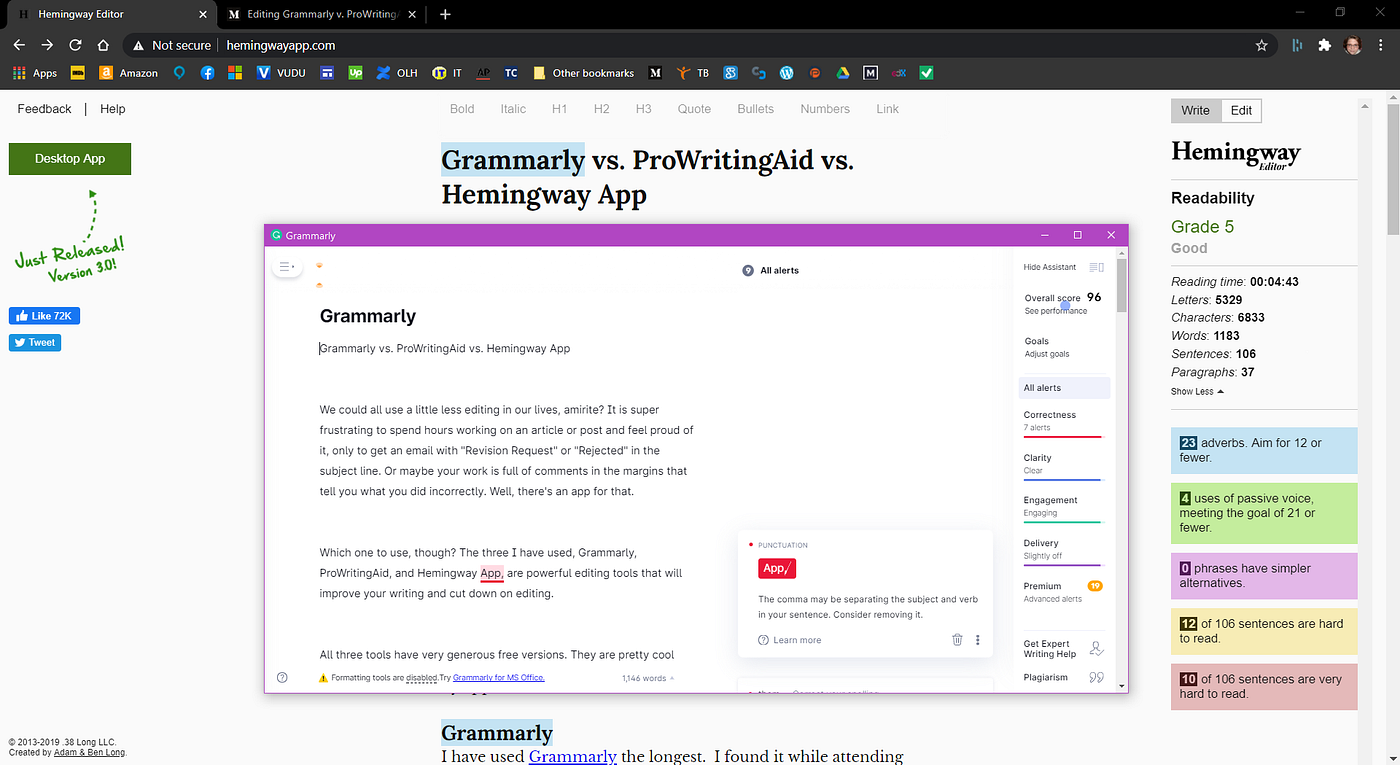
The Grammarly editor scans your uploaded documents and scores your writing out of 100 based on correctness, clarity, engagement, delivery (with suggestions in each category), and premium features, which can’t be viewed in depth, but the number of errors will decrease if you guess your error(s) and correct it.

You can adjust goals for audience, formality, domain (style), tone, and intent for each document you open in the editor for custom editing.

The free version has really expanded since I last used it, and Grammarly is a great tool to have.

Grammarly desktop editor

Go Pro (Not The Camera)

The Pro version delves into comma usage and includes a plagiarism checker, vocab enhancement, and other features such as passive-voice usage and outdated language. You can also receive help and feedback from a human editor. It’s $30 a month or $11.66 a month billed annually.

ProWritingAid

I have been using ProWritingAid since I saw it mentioned in an article somewhere online a couple weeks ago. PWA informed me I’m a very passive writer. Reading up on copywriting and content writing informed me editors frown upon passive writing. What can I say? I’m a very passive person, so of course, it would show in my writing.

The Editor

The free PWA Editor opens in a browser and you can upload your documents or start typing away in the editor. There is also a chromium-based browser extension. There are so many freakin’ features!

In the editor, there are all these things at the top to check so many aspects of your writing. I’ll include a picture because it’s really extensive and impressive. When you’re done doing your thing (or before that, in case your computer crashes or the electric goes out), you can save the document or export it to your computer.

The PWA browser extension works like Grammarly (they do not work together) and has a contextual thesaurus. You can disable PWA on the site you’re at and also choose your writing style, which includes general, academic, business, and script. Pretty nifty.

ProWritingAid in-browser editor. Look at those features!

Go Pro (Again, Not The Camera)

The Pro version of PWA includes much more. You can download the desktop app to use offline. In the browser editor, you can save your document to a host of places such as Google Docs, MS Office (which includes Word and Outlook), Firefox, Chrome, PWA’s desktop app, and some other ones I’m unfamiliar with by looking at a logo. You can also request a human editor for feedback.

Hemingway App

Named after the famous author, the free Hemingway App is decent, but I’m getting a bit annoyed while writing this. It keeps taking me to the top of the page any time I do something other than type; this includes hitting Enter once or switching browser tabs. I don’t know the logic behind this.

The Editor

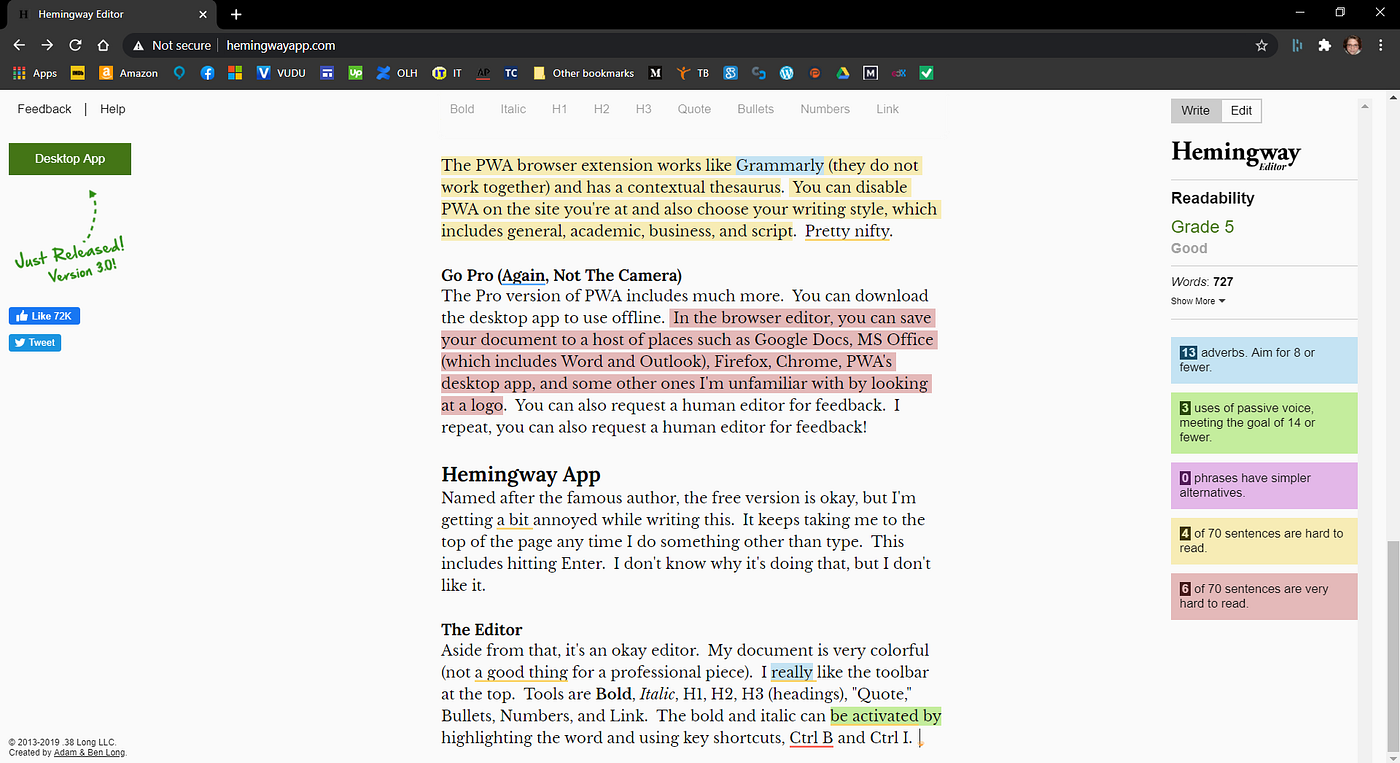
Aside from that, it’s an okay editor. My document is very colorful (not a good thing for a professional piece). I really like the toolbar at the top. Tools are BoldItalic, H1, H2, H3 (headings), “Quote,” Bullets, Numbers, and Link. The bold and italic can be activated by highlighting the word and clicking on Bold or Italic or by using key shortcuts, Ctrl B and Ctrl I.

Grading

While the editor grades readability, it’s not very helpful, in that it doesn’t offer suggestions unless only one or two words are highlighted. Right now, this sentence is yellow (hard to read), and hovering over the sentence with the mouse doesn’t suggest how I can fix it; it just tells me it’s hard to read.

The words “are highlighted” are highlighted in green and hovering over that tells me it’s passive voice and I should use active voice. I’m given the option to click on “omit,” which deletes the words, then takes me back to the beginning of the document (really annoying).

I like the word count and error count included on the side. I have a 5, but I don’t know what that’s out of. The counter gives you a reading time, letters, characters, words, sentences, and paragraphs in the “Show More” drop-down.

I have used adverbs 15 times and should aim for 9 or fewer; passive voice 5 times, meeting the goal of 16 or fewer; no phrases have simpler alternatives; 9 of 82 sentences are hard to read; and 6 of 84 sentences are very hard to read, including this one. (Sorry, guys!)

I think more suggestions would make Hemingway on par with Grammarly and ProWritingAid. If we knew what sounded best and increased readability, we wouldn’t be making the errors in the first place. I don’t see any spell checking taking place by Hemingway.

Hemingway App in-browser editor. The underlines are the PWA extension.

Go Pro (You Get It)

The Hemingway App desktop app is a steal at $19.99. You can work offline or publish directly to Medium or WordPress from the desktop app. Not on Medium or WordPress? That’s okay, too. The desktop app handles headings, formatting, and links so you don’t have to.

Conclusions

For me, it’s an almost-tie between free Grammarly and ProWritingAid. I would choose PWA for certain if I went Pro. If you are colorblind, the coloring will not be beneficial to you, but clicking on the underlined words or phrases in Grammarly and PWA will give you the information you need. With Hemingway, the Readability feature on the right will help you out.

Stick a Fork in Me; I’m Done

I worked on my Shakespeare PowerPoint presentation for hours and a couple of hours after submission, my teacher emailed me to let me know how bad it was and that it didn’t make sense. For context, I love making PowerPoints because I can be very creative with them and every teacher before this one has loved them; most recently, my literary theory professor.

I spent most of the day crying and jerking (I don’t know why I jerk) before finally taking my anxiety medication and getting some sleep. My perfectionism did not let me not submit my final paper. I had most of it done, anyway.

On a good note, Taylor’s new album comes out in one day!! It is also Mom’s death anniversary, but I have something to smile about on that day finally. It is a little light in the dark that has been the last couple of weeks.

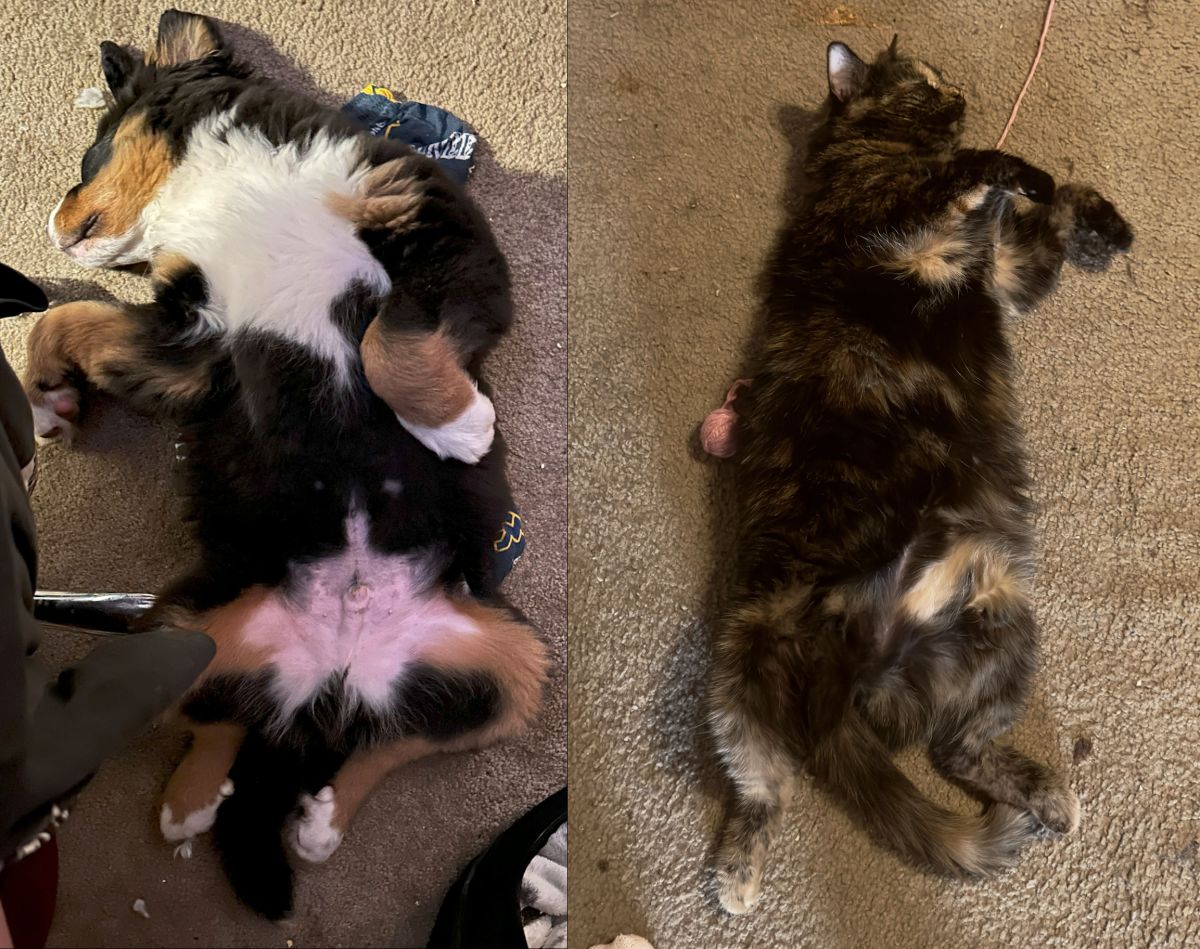
I don’t remember if I mentioned it here but I changed my pup’s name to Oliver instead of Oswald. He just does not seem badass enough to be an Ozzy 😂. He has taken the change quite well and we call him Ollie. Adam calls him Oliver Twist, so I guess he is Oliver Twist Hemingway. He has been very helpful with reducing my stress since he is pretty cuddly, but, like Neville, he wants to lick my face when we are facing each other.

And, my goodness, these boys are so jealous! When I take them out to pee, Neville gets back on the porch before Ollie and gets on my lap. I found out yesterday that Nev’s head comes to my shoulder when he is standing on his back legs, which he can take several steps like this (it’s kinda creepy, like the Scooby Doo movie). I introduced Ollie to my sensory room and we lay on my soft rug and Mom’s Steeler throw. He did pretty well being still. I really need to get a video of him jumping off the porch; it is hilarious. I want to make a little red cape with an O on it.

Malicious Compliance

I swear, I have not cried this much since taking Applied Statistics 😭😭😭!! Aside from my poetry workshop professor being totally useless and providing no guidance, my Shakespeare teacher is just as bad, if not worse. She gave me an F on my final project rough draft! No, I did not earn an F; it was freely (and probably gleefully) given. Unless people are dying or I’m drowning in untreated depression, I do not get Fs. The only non-A grade I’ve earned is a C+ in statistics. I’m giving a breakdown, so if you don’t want to read a lot of whining, I suggest skipping this post.

Contradiction One

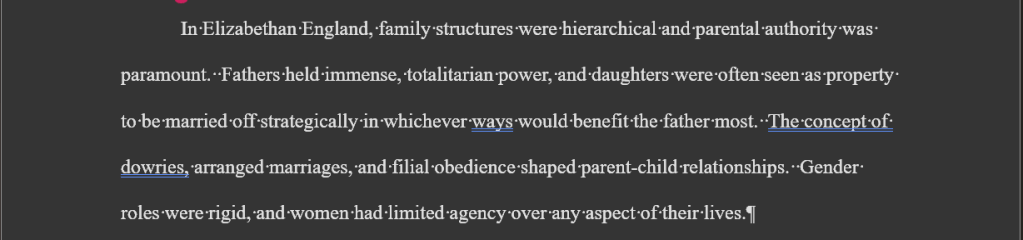
This assignment is a partial rough draft of my final paper. Partial, as in not complete, because we are just starting week 6 and this was week 5’s assignment and there are 8 weeks per term. Okay, so the entire final paper is supposed to be four to eight pages including the References page, which is a page by itself. I submitted three written pages and one References page, so that is four pages for a partial rough draft. I get zero points in the spelling and grammar section because my four pages include the References page. That is my only zero on this assignment. There is no paper-length grading section, so she just stuck the zero in spelling and grammar, which is a travesty in itself because I am a spelling and grammar Nazi.

Contradiction Two

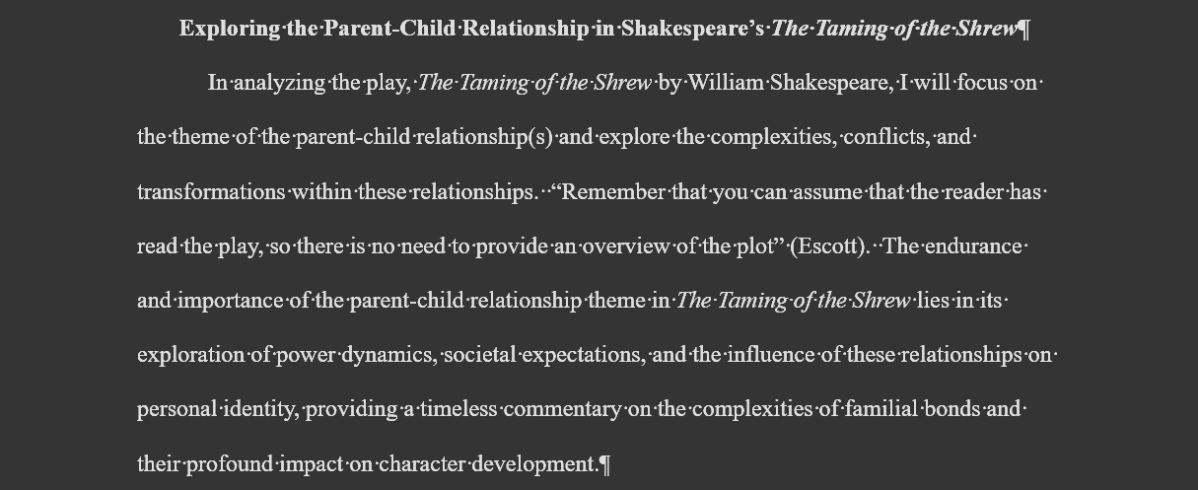
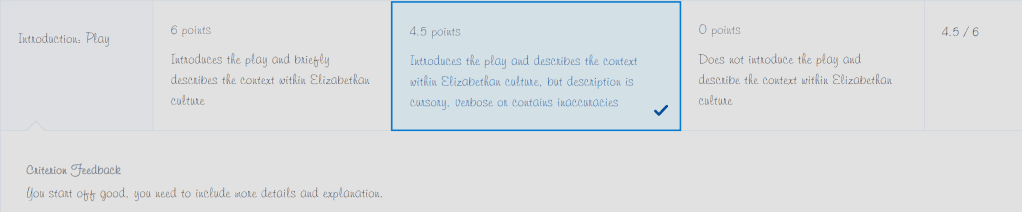
As seen in the announcement above, there is no need to summarize the play and provide an overview of the plot. Okie-dokie. I don’t feel it is necessary, so I leave out the plot and go on to briefly describe the context within Elizabethan culture.

And I get the grading score below 👇👇.

It should be, “You start off well…”

Contradiction Three

As a general rule, I do not like using quotes in my papers because that makes the school’s TurnItIn anti-plagiarism program’s score higher and a lot of teachers won’t even audit the program to see if it is capturing properly cited and quoted texts (quotes) and flagging them as plagiarism. I would rather write it in my own words and include the references on the References page, as one’s supposed to do even with paraphrasing or rephrasing. So, I did the latter, per usual, for my thematic summary and got positive feedback with this comment:

Since I can follow directions and take feedback well, I added direct quotes and in-text citations in my partial rough draft. Same approved scholarly resources, but I pulled some quotes from a couple of them and cited them. I am now told to not use “long quotes” (it was bullet points) and instead “use [my] own voice” and also not end on quotes but my own voice; you know, like I was doing before. Just…whatever.

Since she has pissed me off, and I can be petty, I included a quote from her announcement about not needing to summarize the play (in-text citation and including her in the references) and am doing a play-by-play of The Taming of the Shrew and the movie 10 Things I Hate About You since I am so “vague.” I go through the rubric point by point to make sure I cover everything, and I have taken 300-level classes before and aced them, so I do not believe I am missing something.

The (Frugal) Student Life

Before I share my latest mistake I am in the process of making, I wanted to share some college student “hacks.” I need to save money when I can because I am terrible at money management; probably because of ADHD and the fact that I lived with Mom until she died and I did not have to pay rent. I will gladly buy a TV for $400 (but really, $400 for a name-brand 65″ LED smart TV?!?), but I will search to the ends of the Internet to pay as little as possible for toiletries and life essentials. That’s just me. I’ve come to terms with it and am aware of it.

Speaking of, the place I shop for most of my items now has a price adjustment thing, which rocks so hard. For 30 days from purchase, you can request a price adjustment and get the difference back if the item went on sale after you bought it. Once, I bought a little desk fan for $15 and it went on sale for $7 after I bought it. I requested a price adjustment and received $8 back. How awesome is that?! More recently, I got $6 back for two surge protectors because they went on sale, so I paid $7 for each surge protector, compared to paying $20 or $30 on Amazon for the same ones.

I just requested a price adjustment on an order, which made me think of talking about it here, and received $5 because several items dropped in price. You can choose to get the refund as credit or back on your payment method, so no pressure on spending the refund at that place. The only other time I’ve seen that is when I bought my Bose headphones for work and they went on sale for Christmas after that. I just contacted customer support and received $60 back, which is super awesome of Bose.

That was not one of my college hacks, but it is still a money-saving option. I will not disclose the shopping place because they are being smeared at the moment and most of the “facts” are total lies.

Onto the college money-saving tips. Firstly, you will need proof that you are in college. For most places, it is as simple and straightforward as verifying enrollment with your school email address. Verify.Me and another similar place are used by some as well. Other places may require your school schedule or proof of enrollment, both of which are easy enough to obtain.

Spotify Premium and Hulu (with ads)

I’ve used Spotify Premium since starting college. Back in 2018, the bundle was Spotify Premium, Hulu with ads, and Showtime for $4.99/month. Super awesome deal. Now, it is Spotify Premium and Hulu with ads for $5.99/month, which is still a good deal. New users get one month free. Adam and I cannot listen to Spotify at the same time, but we rarely do, so I still find it worth it.

Apple Music

Since we have attempted to listen to music at the same time and Adam’s music is influencing my music recommendations, I re-joined Apple Music. For students, it is $5.99/month. I still use Spotify the most because not all of my music is available through Apple, which I don’t understand. Namely, Olivia Rodrigo. They recently included Apple TV+ in this, but I believe it said for a limited time.

Amazon Prime Student and Amazon Music Unlimited

Now, I am still mad at Amazon, so I do not get Prime or Music Unlimited from them anymore. However, students can get Amazon Music Unlimited for $5.99/month after one month free. For Amazon Prime Student, you can get six months free and then it is $6.49/month or $69/year, which is half off the regular price. That is a great deal. Sadly, when Mom was alive, a year of regular Prime was $79/year and it is over $120 a year now.

I left Prime when they decided to raise the price every other month (it seemed) and started adding ads for Prime Video, which is not cool. Plus, they are gearing up to make Alexa/Echo into a subscription-based service, and around the time that was brought to the table, Alexa started to mysteriously get worse and worse to the point that I am switching to Google Nest as soon as I am able. It is not my fault that everyone is using a home assistant as a home assistant instead of a shopping buddy.

DoorDash

We have DoorDash here and you can get DashPass for $4.99/month. I use the service enough that it is worth getting most months. I find it much cheaper than Instacart, but they do not offer the same amount of stores, although they are expanding beyond restaurants and convenience stores.

Zenni Optical

Zenni just rocks on principle. They have the cheapest quality glasses I have found. For normal prescriptions, you pay for the frames, optional coating, and shipping. Since they have frames for as little as $6.95, I have paid under $20 for several pairs of glasses since discovering this site. They are nice glasses, too. I usually get coating which is $4.95 (basic) or $14.95 (oil and fingerprint resistant) depending on what I want, and it is still loads cheaper than other places. Anyway, they offer a 10% student discount. With my last glasses, I had to get bifocals or progressives, so it was frames ($20), optional coating ($4.95), $52 for progressives, and shipping. With the student discount, my glasses were under $80. It was either $70 or $77.

There are more ways to save if you’re a college student, but those I mentioned are the ones I know and use. A quick Google search for student discounts brings great results. Instacart supposedly offers some kind of student discount but I cannot find it. They seem stingier than other places. Happy shopping!