I lost a lot of respect and admiration for someone I knew growing up. She was an authority figure in my high school in a teaching and athletic capacity. My rose-colored glasses didn’t turn to turd goggles because of what this person aligns with or what she believes, I’m not that immature and do not think I am morally superior to anyone. On the contrary, that’s what was done to me, and I’ve been crying about it since.
I am nice to everyone, in person and online. The only time I am salty is when someone is picking on someone else, which really burns my biscuits. I don’t even get that way when they pick on me because when I comment, I very, very rarely read any replies my comment gets, especially around hot-button topics. I say my piece and peace out.
All of these people spouting off about being kind to everyone and unifying and whatnot are full of it. It is performative. What they mean is to be kind and unite with people who agree with and think like them, and it is always the case. I don’t expect people I associate with or like/love to share my views and beliefs. Heck, my mom and I disagreed greatly on most hot-button topics! She’s still one of the loves of my life and always will be. Everything doesn’t have to be either/or or black and white (which is crazy ironic seeing that I am autistic and view a lot of things in black and white).
What is really upsetting is how pervasive this is among everyone, online and in-person. It is disgusting, pathetic, and immature. And the whole, “well, they did it first!!” (in the most whiny, annoying, childish voice possible) just shows what a loser the person saying it is. If you base your actions and considerations on what someone else “did first,” you’re not that great of a person. For all the superiority and morality these people spew, they sure don’t practice what they preach in the slightest.
It’s gotten to the point where businesses and organizations are turning people away or kicking them out for what they believe and value. In the US. People are opting out of music festivals because some of the performers and/or coordinators have different views and vote differently. Actors, musicians, and other artists are being blacklisted for their beliefs, views, and voter registration. Careers and livelihoods are being destroyed. And no one will admit that that’s the real fascism this country is facing (specifically, the control of mass media, censorship, and open hostility toward academia, art, and critical thinking; and the rejection of an opposing party and their supposed equal freedoms).
We could all use a little less editing in our lives, amirite? It is super frustrating to spend hours working on an article or post and feel proud of it, only to get an email with “Revision Request” or “Rejected” in the subject line. Or maybe your work is full of comments in the margins that tell you what you did incorrectly. Well, there’s an app for that.
Which one to use, though? The three I have used, Grammarly, ProWritingAid, and Hemingway App, are powerful editing tools that will improve your writing and cut down on editing.
All three tools have very generous free versions. They are pretty cool apps, but I’m sure the paid versions are much more useful and worth the money. I’m typing this in the Hemingway App editor since I haven’t used it much. Let’s get started!
Grammar and Editing Applications
Grammarly, ProWritingAid, and Hemingway Editor are apps designed to help you write well. They check your spelling, grammar, sentence structure, and more. I’ll go through them app by app.
Grammarly
I have used Grammarly the longest. I found it while attending college because English Comp I and II tried to kill me. The free version includes a chromium-based browser extension, desktop app, Microsoft Word add-in, Outlook add-in, phone app, and new iPad app. I’m an Apple person, so I don’t know about other tablets. The iPad is a new feature.
Grammarly catches misspelled words and normal “common” mistakes like your/you’re, judgment/judgement, its/it’s, there/their/they’re, is/are, etc., all on the fly (as you are typing). A newer feature will let you see what tone your writing is in, be it business, academic, casual, humorous, and the like.
Performance Scores
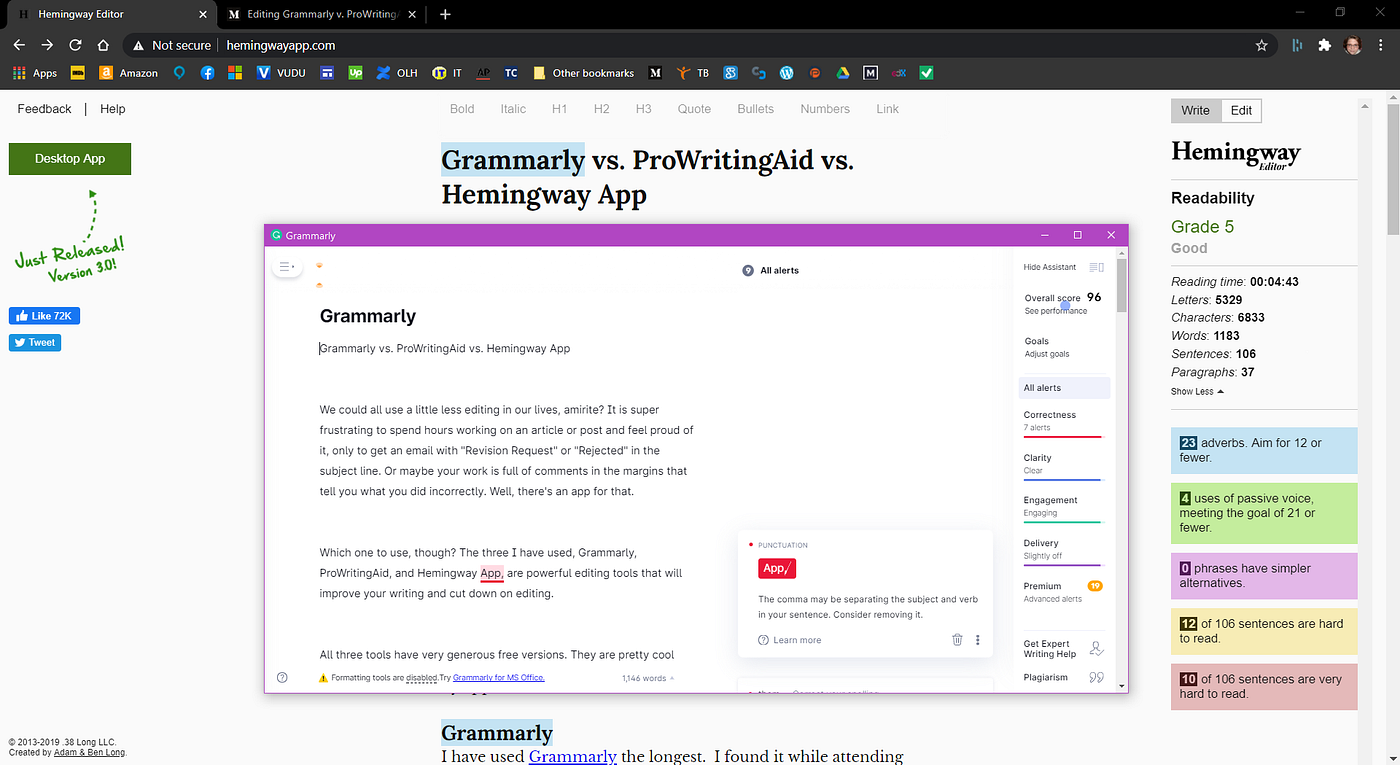
The Grammarly editor scans your uploaded documents and scores your writing out of 100 based on correctness, clarity, engagement, delivery (with suggestions in each category), and premium features, which can’t be viewed in depth, but the number of errors will decrease if you guess your error(s) and correct it.
You can adjust goals for audience, formality, domain (style), tone, and intent for each document you open in the editor for custom editing.
The free version has really expanded since I last used it, and Grammarly is a great tool to have.
Grammarly desktop editor
Go Pro (Not The Camera)
The Pro version delves into comma usage and includes a plagiarism checker, vocab enhancement, and other features such as passive-voice usage and outdated language. You can also receive help and feedback from a human editor. It’s $30 a month or $11.66 a month billed annually.
ProWritingAid
I have been using ProWritingAid since I saw it mentioned in an article somewhere online a couple weeks ago. PWA informed me I’m a very passive writer. Reading up on copywriting and content writing informed me editors frown upon passive writing. What can I say? I’m a very passive person, so of course, it would show in my writing.
The Editor
The free PWA Editor opens in a browser and you can upload your documents or start typing away in the editor. There is also a chromium-based browser extension. There are so many freakin’ features!
In the editor, there are all these things at the top to check so many aspects of your writing. I’ll include a picture because it’s really extensive and impressive. When you’re done doing your thing (or before that, in case your computer crashes or the electric goes out), you can save the document or export it to your computer.
The PWA browser extension works like Grammarly (they do not work together) and has a contextual thesaurus. You can disable PWA on the site you’re at and also choose your writing style, which includes general, academic, business, and script. Pretty nifty.
ProWritingAid in-browser editor. Look at those features!
Go Pro (Again, Not The Camera)
The Pro version of PWA includes much more. You can download the desktop app to use offline. In the browser editor, you can save your document to a host of places such as Google Docs, MS Office (which includes Word and Outlook), Firefox, Chrome, PWA’s desktop app, and some other ones I’m unfamiliar with by looking at a logo. You can also request a human editor for feedback.
Hemingway App
Named after the famous author, the free Hemingway App is decent, but I’m getting a bit annoyed while writing this. It keeps taking me to the top of the page any time I do something other than type; this includes hitting Enter once or switching browser tabs. I don’t know the logic behind this.
The Editor
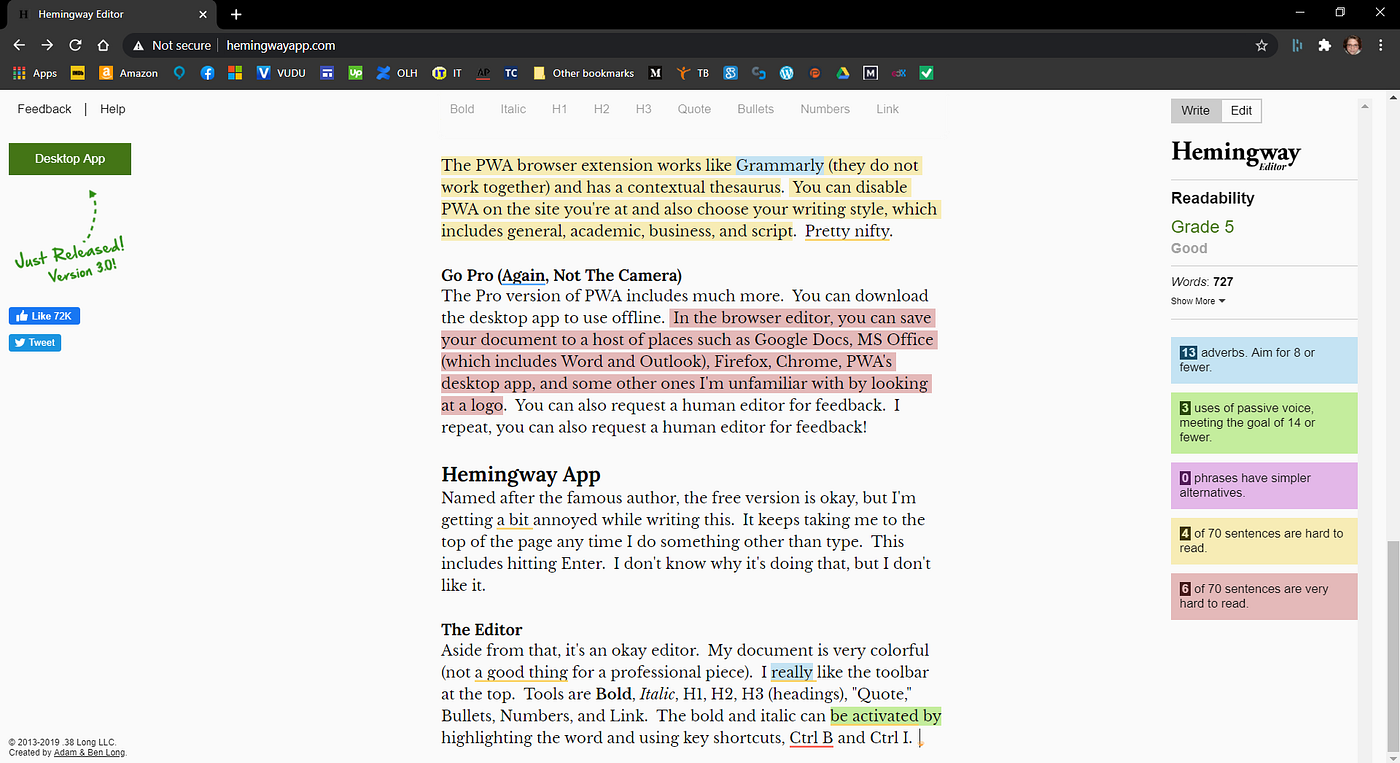
Aside from that, it’s an okay editor. My document is very colorful (not a good thing for a professional piece). I really like the toolbar at the top. Tools are Bold, Italic, H1, H2, H3 (headings), “Quote,” Bullets, Numbers, and Link. The bold and italic can be activated by highlighting the word and clicking on Bold or Italic or by using key shortcuts, Ctrl B and Ctrl I.
Grading
While the editor grades readability, it’s not very helpful, in that it doesn’t offer suggestions unless only one or two words are highlighted. Right now, this sentence is yellow (hard to read), and hovering over the sentence with the mouse doesn’t suggest how I can fix it; it just tells me it’s hard to read.
The words “are highlighted” are highlighted in green and hovering over that tells me it’s passive voice and I should use active voice. I’m given the option to click on “omit,” which deletes the words, then takes me back to the beginning of the document (really annoying).
I like the word count and error count included on the side. I have a 5, but I don’t know what that’s out of. The counter gives you a reading time, letters, characters, words, sentences, and paragraphs in the “Show More” drop-down.
I have used adverbs 15 times and should aim for 9 or fewer; passive voice 5 times, meeting the goal of 16 or fewer; no phrases have simpler alternatives; 9 of 82 sentences are hard to read; and 6 of 84 sentences are very hard to read, including this one. (Sorry, guys!)
I think more suggestions would make Hemingway on par with Grammarly and ProWritingAid. If we knew what sounded best and increased readability, we wouldn’t be making the errors in the first place. I don’t see any spell checking taking place by Hemingway.
Hemingway App in-browser editor. The underlines are the PWA extension.
Go Pro (You Get It)
The Hemingway App desktop app is a steal at $19.99. You can work offline or publish directly to Medium or WordPress from the desktop app. Not on Medium or WordPress? That’s okay, too. The desktop app handles headings, formatting, and links so you don’t have to.
Conclusions
For me, it’s an almost-tie between free Grammarly and ProWritingAid. I would choose PWA for certain if I went Pro. If you are colorblind, the coloring will not be beneficial to you, but clicking on the underlined words or phrases in Grammarly and PWA will give you the information you need. With Hemingway, the Readability feature on the right will help you out.



 Cari R Esta